Setting up your Meta accounts is only the start of your business journey. You set them up, leave them for a bit, maybe post a few times before the throes of business life divert your attention. Or maybe you cultivated a great community of followers over a number of years with a view to *maybe* do something with it that will generate you a better income one day.
Wherever you are in your social media marketing journey, even if it is on a break at the moment, making a note of your account ID and taking screenshots of your profile is something you need to do.
It’s a one time job and it will save you a lot of stress should anything happen to your accounts.
Hacks, post violations, glitches in the matrix that are not your fault can make your account disappear. And not just your business profile – your personal meta account (Facebook profile) can also be sent to the Meta sin bin.
Trust me, if this happens then it is a royal pain in the bum to claw it back from Meta and get it reinstated.
What information should you be recording?
- Record your Account IDs
You need a record of your Account IDs across your personal and business profiles, your Business Suite ID and your Ads Manager ID. They are all different and unique to you and are more valuable than usernames and passwords when it comes to identifying your account as they cannot be changed by hackers.
- Keep track of your login information.
Most people have multiple email addresses they have collected over the years, make sure your Meta accounts are connected to the email address you are using the most NOW. This will mean that if any one requests access to your Meta account, you stand a better chance of spotting the email alert and being able to act on it.
- Make a note Facebook Profile ID: found in your profile URL, or your vanity URL.
This is the URl link you can customise for your personal and business profile.
- Take screenshots of your profile page, Business Suite Dash and Ads Manager, keeping the URL visible.
Keep everything in a safe place and make sure you guard your login credentials as though they were your banking PIN. You would be surprised how many people are willing to just give me their login.
Where do you find your Facebook ID numbers?
This is a quick guide of where to get your important digits from within Meta.
- Your Facebook Profile ID: found in your profile URL (the number after facebook.com/profile.php?id= or your custom URL)
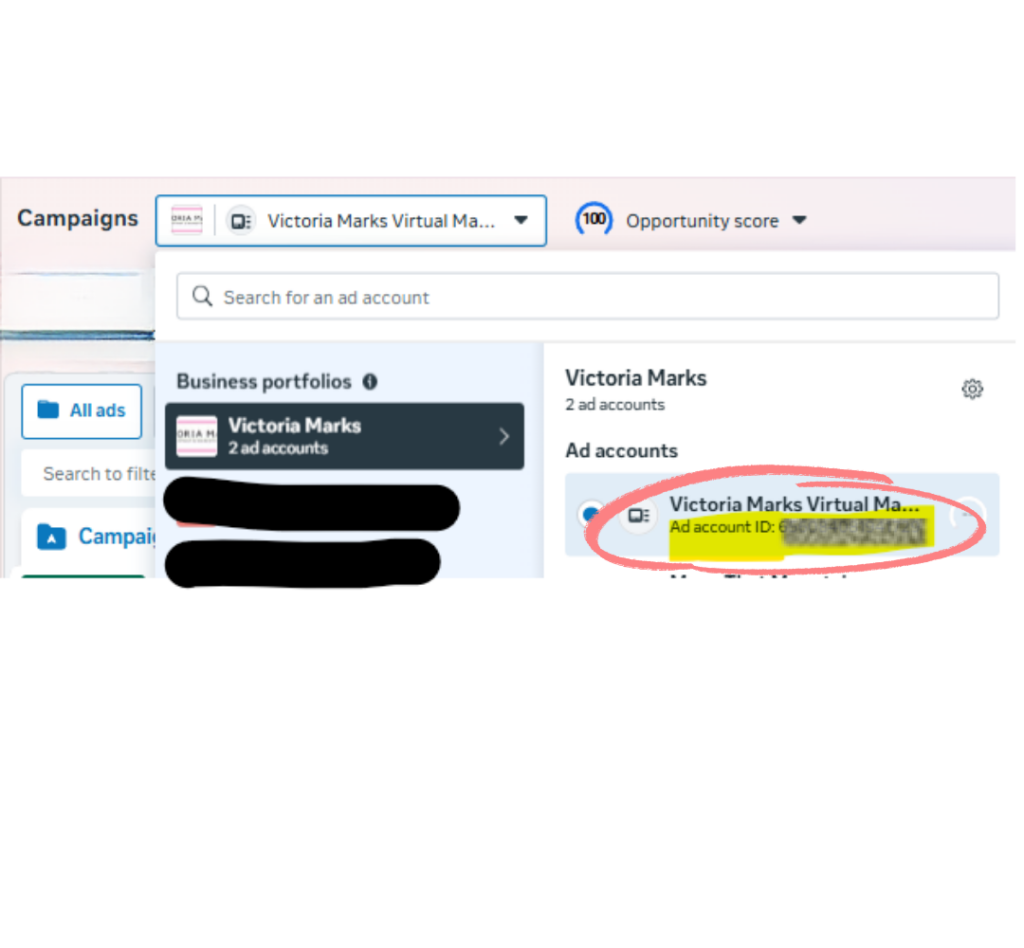
- Your Facebook Ad Account ID (shown in the image): found in Meta Business Manager → Accounts → Ad Accounts (format: act_XXXXXXXXXX)
- Your Meta Business Account ID: found in Business Settings → Business Info at the top of the page
- Your Instagram Account ID: can be found using third-party lookup tools
Tip: Screenshot all your account IDs NOW before anything goes wrong and store them in a secure note
Not sure whether your Meta account set up is optimised or how to get your ID information?
A Meta Account Health Check is a cost effective way to make sure that your accounts are as secure as they can be, and optimised so that if you ever need account recovery then you have the information at your finger tips. Contact me to arrange a Health Check.
What to do if your account is hacked/compromised
If you are unfortunate enough to have your account compromised, then swift action is the best advice. Get into your Business Suite Account and click the help button and go through the steps to get to ‘Contact Support’.
The navigation changes, but the principle doesn’t – get into Business Suite, find the Help button, and push for Contact Support. Don’t stop until you reach a human.
I offer a consultancy session where we screen share and work through the recovery process together with Meta. I can’t guarantee outcomes, nobody can with Meta, but having someone experienced in your corner makes a real difference. You can book this through my Power Hour